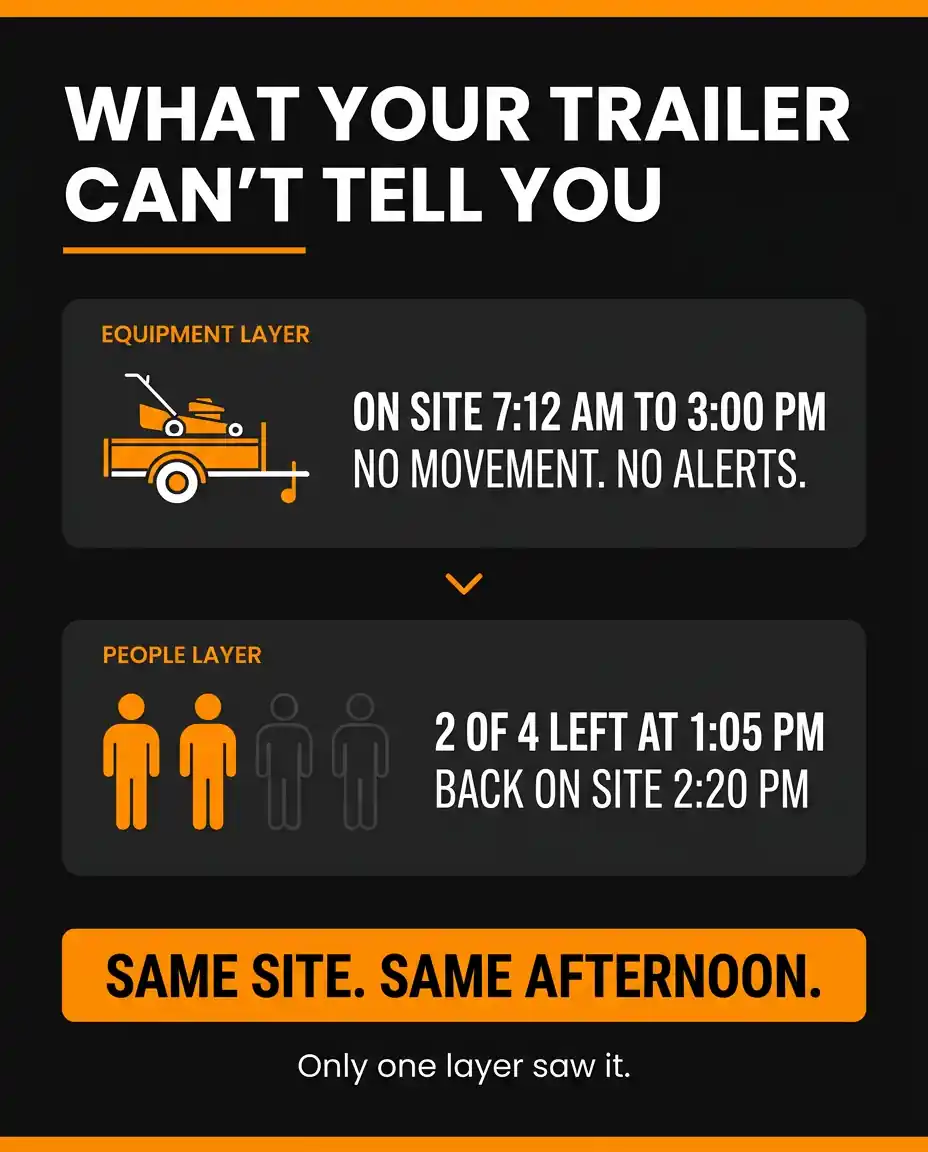
It is 2:40 on a Thursday afternoon. You pull up the fleet map on your phone and everything looks exactly the way it should. The trailer has been sitting at the Brookside job since 7:12 that morning. The stand-on mower is there. The skid steer is there. Nothing has moved, no alerts have fired, and as far as your map is concerned that job is fully staffed and running.
Here is what the map does not show you. Two of the four guys on that crew climbed into a personal truck at 1:05 and went to get lunch, then went to a hardware store, then went to a second hardware store. They rolled back onto the property at 2:20. The equipment never moved an inch. The trailer sat there all afternoon quietly reporting that everything was fine.
You billed the customer for four men from seven to three. Your timesheets say four men from seven to three. Your GPS data says the equipment was on site from seven to three. Every record you have agrees with every other record you have, and all of them are wrong in the same direction, because none of them were actually watching people.
That is the gap. Equipment tracking answers the question "where is my stuff." It does not answer the question every project manager actually asks at two in the afternoon, which is "who is standing on that property right now."
The Blind Spot Nobody Talks About in Asset Tracking
Asset tracking has been sold to landscaping and hardscaping companies the same way for twenty years. Put a tracker on the trailer, put a tracker on the mower, put a tracker on the truck, and now you can see your fleet. That is true, and it is genuinely valuable. Equipment location is the backbone of job costing, route planning, and arrival verification.
But there is an assumption buried inside it that nobody says out loud: that the equipment and the people are the same thing. That if the trailer is on site, the crew is on site. That when the truck pulls off the property at 3:15, everybody left at 3:15.
On a well-run job that assumption holds up most of the time. The problem is that "most of the time" is not a record. And the times it breaks are exactly the times you would want to know about:
- A crew member gets picked up by a friend and leaves early while the trailer stays for the rest of the shift
- Two guys take a personal vehicle on a long supply run that nobody logged
- A foreman drops equipment at a site in the morning and is somewhere else entirely by ten, but the equipment reports him present all day
- A worker rides to the site in the company truck, then spends three hours at a property two doors down doing side work
- Somebody signs in on a paper sheet for a coworker who never showed up at all
Every one of those scenarios produces the same fleet map: equipment parked, no movement, no alerts, everything normal. The tracker is doing its job perfectly. It just was not designed to answer the question you are asking.
Two Layers, One Map
TeamTrax is the companion app AlerTrax built to close that gap. You install it on any Android or iOS phone, sign in with your AlerTrax account, and that phone shows up in your AlerTrax dashboard as another device sitting right alongside your trailers, mowers, and trucks.
That last part is the whole point. It is not a separate portal, a separate login, or a separate report you have to cross-reference at the end of the week. Your people and your equipment appear on the same map, in the same app, feeding the same alerts and the same history. When you open the dashboard you are not looking at where your assets are and guessing about the crew. You are looking at both at once.
What TeamTrax reports back to your AlerTrax account:
- Live location updates: The phone's position, shown in your AlerTrax dashboard next to your tracked assets.
- Movement alerts: A notification when a phone starts moving.
- Geofences: Enter and exit notifications for any boundary you draw, which is how you get the departure alert this whole article is about.
- Overspeed notifications: Set a speed limit and get told when it is exceeded.
- App status alerts: A ping if the user disables or re-enables the app, so a silent phone is not mistaken for a phone sitting still.
- Location history: Route and activity logs, retained for up to two weeks.
No hardware to buy, no wiring, no install appointment. The phone already in the guy's pocket becomes the tracker.
The Departure You Cannot See From a Trailer
Here is the specific mechanic that changes how a project manager runs a day.
Draw a geofence around the job site. Your AlerTrax device on the trailer sits inside that boundary and stays quiet, because the trailer is not going anywhere. The phones on that crew sit inside the same boundary. The moment one of those phones crosses the line, you get an exit notification, even though the equipment never budged.
Read that again, because it is the part that surprises people. The alert fires on the person leaving, not on the equipment leaving. Those are two completely different events, and until now most landscaping companies only had visibility into one of them.
What that gives a project manager in practice:
- A timestamp on the actual departure. Not when the trailer left. When that individual left. And a matching timestamp when they came back.
- Head count without a phone call. Instead of calling the foreman to ask who is still out there and pulling him off a task to answer, you glance at the map.
- Early warning on a job that is quietly falling behind. A four-man estimate being run by two men for half the afternoon is the single most common reason a job goes over hours, and it usually is not discovered until the invoice does not match the estimate.
- An answer when the customer asks. Property managers ask "how many guys were here on Tuesday" more often than owners expect, and "the trailer was there" is not the answer they are asking for.
The reverse case matters just as much. When a crew member stays late to finish a wall or comes back to a property in the evening to fix something, that shows up too. The same data that catches the unlogged departure also catches the unlogged extra hour, and one of those protects your margin while the other protects your employee.
Why This Shows Up on Paper, Not Just on a Map
There is a compliance dimension here that most owners do not connect to GPS at all.
Under the Fair Labor Standards Act, every covered employer has to keep records for each non-exempt worker, and those records must include hours worked each day and total hours worked each workweek. The Department of Labor is clear that there is no required form for those records. A time clock, a paper sheet, a foreman with a clipboard, or a digital system are all acceptable. The requirement is that the information be accurate (U.S. Department of Labor, Wage and Hour Division, Fact Sheet #21; 29 CFR Part 516).
Accuracy is where crew-level visibility earns its keep. If an employee later disputes their hours and you cannot produce records that counter the claim, the practical result is that the employee's own account of the hours they worked tends to carry the day. Wage and hour guidance describes this as a best evidence problem: whoever holds the better record of time worked generally prevails on the question of time worked. An employer with no independent record is arguing against a written log with nothing in hand.
Payroll records must be preserved for at least three years, and the underlying records that wage computations are based on, including time cards and work schedules, for at least two (29 CFR 516.5 and 516.6).
Equipment location by itself is a weak record of hours worked, because it documents an asset rather than a person. Arrival and departure data tied to an individual is a much stronger one. That is true whether the dispute comes from an employee, a customer, or an auditor.
This section is general information, not legal advice. Wage, hour, and employee monitoring rules vary by state and by situation. Talk to an employment attorney about your specific circumstances.
Running the Numbers on a Gap You Cannot Currently Measure
The honest problem with putting a dollar figure on this is that if you are not measuring it, you do not know how big it is. So treat the following as a worked example with placeholder inputs, not as survey data. Plug in your own numbers.
Say you run four crews of three. Say your fully burdened labor cost is $28 an hour. Now assume that across those twelve people, unlogged off-site time averages 30 minutes per person per week, which could be one long supply run, one early departure, or a few stretched lunches. That is not an accusation of anybody. It is the ordinary friction of a business where nobody has ever been able to see it.
- 12 people x 0.5 hours = 6 hours per week
- 6 hours x $28 = $168 per week
- Over a 34-week season, roughly $5,700
Again, those inputs are illustrative. Yours could be half that or triple it. But notice two things. First, the number does not have to be dramatic to matter in an industry where net margins are commonly in the single digits. Second, and more importantly, the labor recovery is not even the main payoff. The main payoff is that your job costing finally reflects reality, so next season's estimates are built on what the work actually takes instead of what you assumed it took.
Tracking That Turns Itself Off
The first objection any owner raises about tracking employee phones is the right one: nobody wants to monitor a guy's location on a Saturday, and no employee should have to accept that in order to keep a job.
TeamTrax handles that with built-in scheduling. Each user sets automatic start and stop times for every day of the week. The app reports during those hours and does not report outside them. There is also a continuous option for the situations that need it, but for a landscaping crew the schedule is the setting that matters. Tracking runs six to four, Monday through Friday, and switches itself off. No one has to remember to turn it on in the morning or off at night.
That single design choice is what makes this workable as a management tool instead of a fight. You are not asking your crew to be tracked. You are asking them to be visible during the hours you are already paying them to be somewhere specific, which is a very different conversation.
App status alerts round it out. If someone disables the app, you get a notification. Not so you can go chase them down over it, but so a phone that has gone quiet is not silently misread as a phone sitting on the job site all afternoon.
On the data itself, TeamTrax follows the same principles as the rest of the AlerTrax platform. Location data is encrypted, is never sold or shared, and is visible only to you and the account holders you authorize.
How to Introduce It Without Blowing Up Morale
Every company that has rolled out crew visibility successfully did roughly the same thing, and every company that made a mess of it skipped the same step. Tell people first, and tell them why.
A version of the conversation that works:
"We are putting a scheduled tracking app on work phones. It runs during work hours only and shuts off on its own. It is not there to catch anybody. It is there so I can stop calling you for head counts, so we bill jobs for what they actually took, and so when a customer says nobody showed up, I can prove otherwise instead of taking their word over yours."
That last point is not a sales line, it is the truth, and crews figure it out fast. The employee who gets accused of showing up late and can point to a timestamp is better off than the employee whose only defense is his own memory.
Three practical notes on the rollout:
- Put it in writing. A short written policy covering what is tracked, during what hours, and who can see it prevents ninety percent of the arguments.
- Know your state's rules. Tracking assets your business owns is one thing. Tracking a person, especially on a personal phone, is a different legal question, and the notice and consent requirements are not the same everywhere. Our GPS Tracking Laws by State guide breaks down where the lines fall.
- Consider company phones. If you supply the phone, the whole conversation gets simpler for everyone.
Why the Device Still Matters
None of this replaces putting AlerTrax hardware on your equipment. The two layers do different jobs, and neither one covers for the other.
A phone can be left in a truck, run out of battery, get left on a kitchen counter, or belong to a guy who quit last week. The AlerTrax device does not have those failure modes. It is bolted, magnet-mounted, or zip-tied to the asset itself, it runs over a year on two AA batteries with no wiring, and it keeps reporting whether anyone is holding it or not.
AlerTrax was built for how landscaping and hardscaping fleets actually operate:
- Over a year of battery life on two AA batteries: No splicing, no OBD-II port, no install appointment. Mount it and it works.
- Track anything that moves: Trucks, trailers, mowers, skid steers, generators, plate compactors, anything you haul to a site.
- Live GPS tracking: Location updates as often as every 2 minutes, viewable in the app or the fleet portal.
- 100 percent waterproof, ruggedized housing: IP67 rated, built for mud, rain, and pressure washing.
- AddressFence: Upload your customer address list and get arrival and departure notifications for every property, automatically.
- Trip reports and time-on-site logging: Timestamped arrival, departure, and duration for every stop, exportable for job costing and billing.
- Geofence and after-hours movement alerts: Instant notification when an asset moves when it should not be moving.
- Covert magnetic mounting: No visible antenna, no wires to trace, mounts to any steel surface.
Equipment tells you what is on the job. TeamTrax tells you who is on the job. The AlerTrax Fleet Portal puts both on the same screen.
What It Costs
TeamTrax is free. That is not a limited trial with the good parts locked behind an upgrade. All features are unlocked and it stores up to two weeks of tracking history. Download it on any iOS or Android phone, sign in with an AlerTrax account, and start.
Which makes it, frankly, the cheapest way to find out whether any of this is real for your operation. Put it on two phones next week. Watch what the map shows you against what your timesheets say. If the two agree, you have lost nothing and gained a clean record. If they do not, you just found something worth fixing.
AlerTrax hardware is $49.95 per month for 12 months per device, with no long-term contract and no hidden fees. (A $599 Lifetime option is also available if you would rather own it outright with no subscription.)
Order at checkout.alertrax.com, or call us at 800-240-6533 if you would rather talk it through with somebody first.
And Yes, It Helps When Something Goes Missing
Worth a mention even though it is not the reason to do this. When people and equipment are on the same platform, a theft investigation stops being a guessing game about who had what and when. You have the asset's movement history and, during work hours, a record of who was with it. Most of the time that data just confirms the obvious. The one time it does not, you will be glad it exists.
But if theft is the only reason you are considering this, you are underselling it to yourself. The recurring value is in the ordinary Tuesday, not the bad night.
Stop Guessing Who Is on the Property
Your equipment has been reporting in for years. It has told you where the trailer sits, when the mower arrived, how long the skid steer stayed. What it has never been able to tell you is whether the four people you are paying to be there are actually there.
Put TeamTrax on a couple of phones this week and see what shows up. It costs nothing to find out.
Visit buyalertrax.com/teamtrax to download the app, or checkout.alertrax.com to put an AlerTrax device on every piece of equipment you own. Questions? Email sales@buyalertrax.com or call 800-240-6533.
Sources
U.S. Department of Labor, Wage and Hour Division - Fact Sheet #21, Recordkeeping Requirements under the Fair Labor Standards Act
U.S. Department of Labor - Recordkeeping and Reporting: records required for covered, non-exempt workers
29 CFR Part 516.2 - Items required, including hours worked each workday and total hours worked each workweek
29 CFR Part 516.5 and 516.6 - Retention periods for payroll records and supporting wage computation records
AlerTrax product documentation - TeamTrax features, scheduling, history retention, and AlerTrax device specifications